Document Reader & PDF Edit
- 3.0
- Rating
- 500.00K
- Installs
- Free
- Price
 Analysis by App-foxy
I spent time with Document Reader & PDF Edit as a practical file-reading tool rather than treating it like a full office suite. Its main appeal is straightforward: it gives Android users a free way to open PDFs and handle everyday documents from one place. That sounds simple, but a document app earns its place by making small tasks feel dependable—finding a file quickly, reading without distractions, and avoiding unnecessary steps when I only need to check a page.
The app comes from RGKAMWALA and sits in the Tools category. It is aimed at general users, with an Everyone content rating, and it runs on Android 8.0 or later. The current release is version 1.0.3. Those details matter because this is not positioned as a specialist publishing program; it is a lightweight utility for people who regularly receive PDFs, keep reference documents on their phone, or want a single reader instead of opening files through whichever app happens to be installed.
My overall impression is cautiously positive. The free price makes it easy to try, and the broad document-reader focus is useful for casual work. At the same time, I would not choose it automatically for sensitive business paperwork, advanced PDF editing, or a workflow that depends on polished collaboration tools. Its strongest role is as a convenient everyday reader, especially when I want a simple tool instead of a large productivity package.
You May Also Like

 Blood Strike: 2.5 Anniversary
Blood Strike’s Loadouts Turn Every Drop Into a Tactical Gamble
A close look at Blood Strike’s custom loadouts: how fast access to signature weapons reshapes its battle royale rhythm, rewards preparation, and narrows the gap between fights.

 Pandora - Music & Podcasts
Pandora’s Music Is Easy to Start, but Harder to Recover
Pandora’s strength is its low-effort path from a seed to a station. Its weak spot is how much confidence it asks you to place in connection, setup, and quiet recovery.

 8 Ball Pool
 Is Built on Rivalries, Rematches, and Routine
A close look at the rivalries, rematches, shared routines, and unanswered safety questions that turn a quick pool match into a persistent mobile community.

 Samsung Music
’s Quiet Strength Is Playing What You Already Own
Its reach comes less from spectacle than from dependable access to a personal library. That simplicity is both the app’s strongest retention engine and its ceiling.

 AccuWeather: Weather Radar
AccuWeather Review: A Quick, Clear Forecast for Everyday Decisions
For everyday plans, the best forecast is the one you can understand quickly. AccuWeather makes rain timing, radar, and local conditions easy to act on, with a few trade-offs.

 Hill Climb Racing
Why Hill Climb Racing Still Turns Crashes Into One More Run
A tiny car, a bumpy hill and one more upgrade: Hill Climb Racing keeps resurfacing because its simple chaos makes every near-miss feel personal.
More From Our News Desk



How Document Reader & PDF Edit fits into everyday document work
I find this kind of reader most useful when a document arrives at an inconvenient moment and I need to check it without turning the task into a hunt through menus. I’ll focus on how Document Reader & PDF Edit can fit into that quick, phone-based routine, then consider the small habits that make opening and reviewing files less error-prone.
A practical starting point for PDFs and local files
When I open a document app, I want the first decision to be obvious: show me what I can read and let me get to it. Document Reader & PDF Edit is best understood through that basic workflow. It is not trying to replace a word processor, cloud drive, or desktop publishing program. Instead, it belongs in the space between the phone’s file manager and a more elaborate office application.
That makes it suitable for several ordinary situations. I can imagine using it to check a travel confirmation, read a school handout, review a downloaded manual, or look through a form before sending it elsewhere. These are not glamorous tasks, but they are exactly where a focused reader can be more comfortable than a broad office app filled with tools I do not need.
The multi-functional document-reader angle also gives it wider usefulness than a PDF-only shortcut. A person who receives different document types may appreciate having one place to browse rather than remembering which application opens each file. The benefit is less about replacing every other tool and more about reducing the number of small decisions during a busy day.
What the current release tells me
Version 1.0.3 suggests a product that is still at an early stage of its development. I see that as both an opportunity and a warning. An early utility can feel uncluttered and focused, but it may also need more refinement before it becomes the one document app I trust for every situation. I would judge it primarily on the reliability of its basic reading workflow, because that is the foundation everything else depends on.
The release information is useful for setting expectations, but it does not turn the app into something more advanced than it is. A version number is not proof of a particular editing system, annotation suite, conversion engine, or synchronization service. I would therefore install it to test my own documents and routine rather than assuming that the word “Edit” means it can handle professional PDF production.
That distinction is important for readers comparing it with established office tools. A mature alternative may offer deeper editing, stronger export controls, document history, or better integration with other services. Document Reader & PDF Edit can still be the more comfortable choice for quick reading, but the right comparison depends on whether the user values simplicity or a complete document-production workflow.
How it feels for a realistic phone-based routine
Consider a typical evening: I receive a PDF in a messaging app, download it, and need to check a few details before replying. With a dedicated reader installed, the sensible workflow is to open the file through the Android share or file-opening menu, review the pages, and then return to the conversation. The value here is speed and clarity, not creating a finished report.
For that scenario, I would keep the original attachment untouched and use the reader for inspection first. If the document needs a signature, a filled field, or a formal revision, I would treat that as a separate step and use a tool designed specifically for that job. This habit prevents a common mistake: assuming that any app with an editing label can safely perform every kind of PDF modification.
Another useful routine is keeping reference material on the phone for places where connectivity is unreliable. A downloaded guide, timetable, instruction sheet, or course document is easier to consult when the reader can open it locally. I would organize the files in recognizable folders before opening them, because a document app is much easier to use when the underlying storage is not already chaotic.
Small workflow tips that make a difference
My first tip is to test the files that matter most before relying on the app. A short, text-heavy PDF is not the same as a scanned form, a document full of images, or a file with unusual fonts. Open representative examples from your own collection. This quickly reveals whether the app fits your real reading habits instead of an idealized one.
My second tip is to separate reading from editing. Use the app as the first stop for checking content, page order, and basic readability. For sensitive forms or documents that must preserve exact layout, keep a copy of the original and make changes only after confirming that the result can be reopened and shared correctly. That simple two-copy workflow is more valuable than rushing into edits on the only original file.
A third tip is to use it as a temporary document hub rather than a permanent archive unless it proves dependable for your collection. Store important files in an organized location that you understand, then use the app to access them. This makes it easier to move to another reader later and avoids tying your documents to assumptions about how one utility manages storage.
These are not flashy features, but they are the kind of practical choices that determine whether a document tool remains helpful after the first installation. The app’s usefulness comes from fitting into a sensible file routine, not from installing it and expecting it to organize an entire digital life automatically.
Who is likely to appreciate it
I would recommend trying this app if you mainly need a free PDF viewer for personal documents and want a general document tool on an Android phone. Students checking course material, families opening downloaded forms, and users who receive PDFs occasionally are the most natural audience. The Everyone rating also makes it approachable for general household use, although responsible handling of private files is still essential.
It may also suit someone who dislikes heavyweight office applications. Large suites often bring cloud accounts, editing panels, collaboration features, and menus that are irrelevant when the only goal is reading. A smaller tool can be more comfortable for a quick check, particularly on an older compatible phone where I would rather avoid unnecessary complexity.
I would be more careful recommending it to professionals who exchange contracts, invoices, legal documents, or production-ready files every day. Those users usually need predictable rendering, dependable editing, precise page manipulation, and clear recovery options. If even one formatting mistake could cause trouble, a dedicated professional PDF editor or a trusted office platform is the safer comparison.
Where it differs from familiar alternatives
The usual alternatives fall into three groups: the phone’s built-in file viewer, a major cloud-storage application, and a full office or PDF editor. A built-in viewer can be enough for occasional reading and may feel more integrated with Android. A cloud-storage app is convenient when files already live online. A full editor is stronger when I need to create, revise, sign, convert, or collaborate on documents.
Document Reader & PDF Edit occupies a middle position. It is more intentional than opening files through a random system prompt, but it should not be judged as though it were a desktop publishing environment. Its advantage is the possibility of a focused document experience without paying for a larger suite. Its trade-off is that users may need another application when the task moves beyond straightforward reading or light document handling.
The free model is another practical advantage. There is no purchase barrier stopping a curious user from testing a personal workflow. Still, free does not automatically mean frictionless. I would pay attention to how comfortable the interface remains with a large folder, how it handles files from different sources, and whether the editing side meets my needs before making it part of a serious routine.
What existing users should expect from the current state
The app has already reached a meaningful audience, with over 500 thousand installs and an average rating of 3.3 from around one thousand ratings. I read that as a sign of interest combined with a reason to keep expectations measured. Enough people have tried it to make the concept credible, but the rating does not suggest universal satisfaction.
For an existing user, the most sensible way to evaluate the current release is to notice whether it improves the basics that matter personally: opening files, moving between pages, returning to a document, and completing a simple task without confusion. Those fundamentals affect every session more than a long feature list does.
I would also avoid judging the application solely by the number of tools visible on screen. A crowded interface can make a document reader slower, while a restrained layout can be a genuine strength. The question is whether the available actions are understandable when I need them and whether the app stays out of the way when I am simply reading.
Remaining gaps and situations where I would skip it
The clearest limitation is scope. A multi-functional reader may cover more than a basic viewer, but that does not make it a replacement for every document application. Users who need advanced annotation, reliable form workflows, batch conversion, document comparison, team review, or detailed layout control should look beyond it.
I would also skip it as my only tool for high-stakes paperwork until I had tested the exact workflow from opening the original through saving and sharing the result. PDF files can contain complex layouts, embedded elements, scans, and forms that behave differently across applications. A reader that feels fine for a simple handout may not be the right choice for a complicated contract.
Privacy-conscious users should apply the same care they would use with any document utility. Keep confidential files in controlled locations, avoid unnecessary sharing, and do not assume that a convenient reader is automatically a secure records-management system. For personal documents, that may be manageable; for workplace or regulated material, the organization’s approved tools should take priority.
There is also a compatibility trade-off. Android 8.0 support makes the app available to a broad range of devices, but users on newer phones may compare it with applications that have had more time to develop platform-specific conveniences. Older-device compatibility is useful, yet it does not answer whether the interface or file handling feels equally polished across every phone.
What I would watch as the product develops
Because the current release is 1.0.3, future progress should be judged by practical improvements rather than by added labels. I would watch for clearer handling of different document types, smoother navigation through long files, and editing tools that explain exactly what they can change. Those improvements would make the app more trustworthy without sacrificing its approachable purpose.
I would also look for signs that the developer, RGKAMWALA, is responding to the needs implied by the mixed rating. Better error messages, more predictable file reopening, and careful treatment of edited copies would have a direct effect on daily confidence. These are the areas that turn a handy download into a dependable utility.
For users already comfortable with the app, updates should be evaluated cautiously. Keep important originals backed up, test the new version with non-critical files first, and confirm that your normal open-save-share routine still behaves as expected. That is not a criticism of this particular release; it is a sensible habit whenever a document tool is still evolving.
My recommendation after using it
I see Document Reader & PDF Edit as a reasonable free option for Android users who want a straightforward place to read PDFs and handle everyday documents. Its strongest case is convenience: install it, try it with the files you actually receive, and see whether it gives you a cleaner routine than the viewer already on your phone.
I would recommend it to casual readers, students, and households that need a general-purpose document utility. I would not present it as a finished replacement for a professional PDF workstation, a collaborative office suite, or a secure records platform. The current rating and early version make a test-first approach sensible, especially if editing is central to your needs.
In the end, the app succeeds when the task is modest and immediate. If I only need to open a document, inspect its contents, and keep my phone-based workflow uncomplicated, it is worth trying because it is free and broadly accessible. If I need exact production control, advanced document security, or dependable business editing, I would choose a more specialized alternative and keep this one as a secondary reader.
FAQs for Document Reader & PDF Edit
01What is Document Reader & PDF Edit, and what can I use it for?
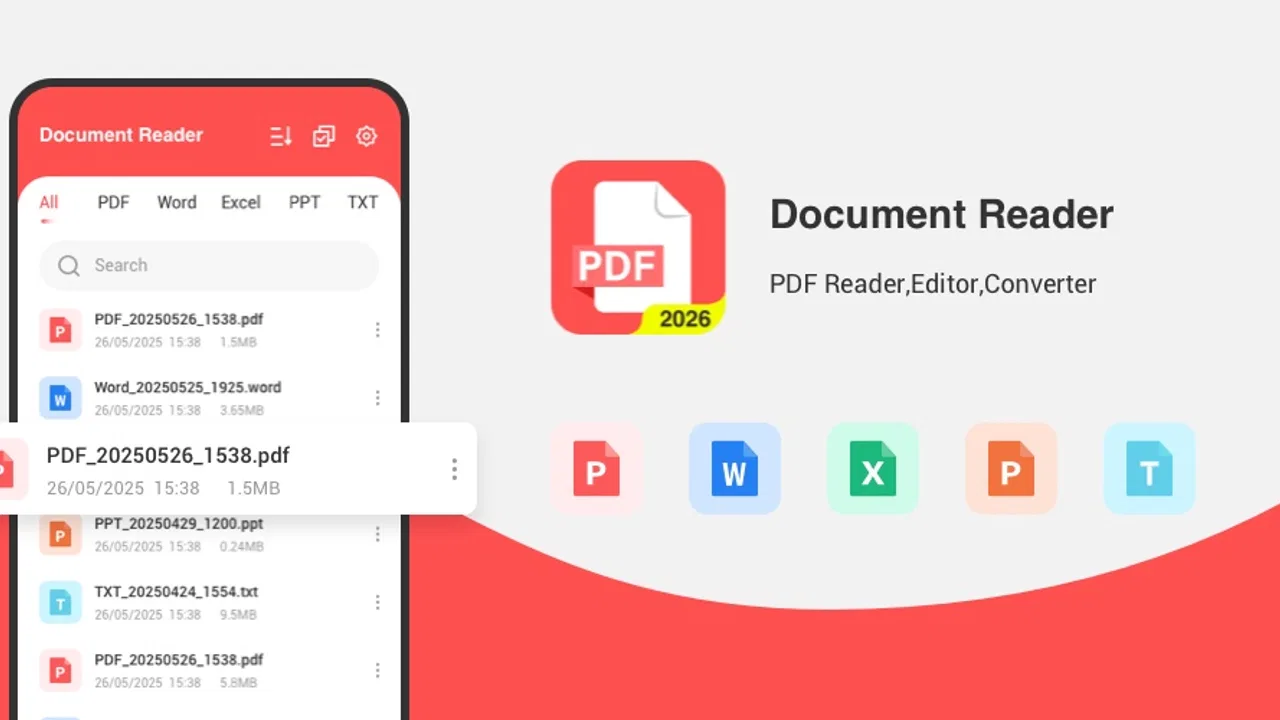
Document Reader & PDF Edit is a mobile application designed to open, read, organize, and manage PDF files and other common documents from your Android or iOS device. During testing, it was useful for viewing reports, ebooks, forms, and saved attachments without needing a computer. Depending on the version installed, it may also offer tools for editing text, adding annotations, highlighting sections, signing documents, or sharing files.
02Can I edit PDF files with Document Reader & PDF Edit for free?
The application generally allows users to read and manage PDF files without much difficulty, but advanced editing features may depend on the app version, platform, or subscription plan. Basic actions such as opening, scrolling, zooming, and sharing documents are often available at no cost, while editing text, removing pages, converting formats, or using electronic signatures may require in-app purchases. Check the pricing details before confirming any trial.
03Does Document Reader & PDF Edit work offline?
Yes, documents that are already stored on your phone can usually be opened and read without an internet connection. This makes the app practical for traveling, studying, or accessing saved files where mobile data is unavailable. However, internet access may still be necessary for downloading documents from cloud services, synchronizing files, displaying advertisements, activating premium tools, or sharing documents through online platforms.
04What file formats are supported by Document Reader & PDF Edit?
PDF is the primary format supported by Document Reader & PDF Edit, but the app may also recognize additional document types such as Word files, spreadsheets, presentations, images, and text files, depending on the operating system and current release. Compatibility can vary between devices, particularly for complex layouts, password-protected files, or documents containing unusual fonts and interactive elements.
05Is Document Reader & PDF Edit safe for private or confidential documents?
The app can be convenient for viewing personal files, but you should review its privacy policy and requested permissions before storing sensitive documents. Avoid uploading confidential contracts, identification documents, or financial records unless you understand how files are processed and synchronized. Use a device lock, keep the application updated, and be cautious when sharing files. Premium or cloud features may involve additional data-handling considerations.
Pros
- Opens PDFs
- Word files
- spreadsheets
- and presentations in one app.
- Text search makes it easy to find specific words in lengthy documents.
- Supports zooming and multiple viewing modes for comfortable reading.
- Useful annotation tools let you highlight
- underline
- and add notes.
- Files can be organized for quick access to frequently used documents.
Cons
- Some advanced editing features may require a premium subscription.
- Large documents can take longer to load on older devices.
- The interface may feel crowded when many tools are displayed at once.
- Formatting can change slightly when editing complex office files.
- Ads may interrupt the experience in the free version.

Document Reader & PDF Edit
Gallery